
I am a cyber security analyst at The Art of Linux. Founder : Tricay Myanmar Social Network & BurmeseHub.
Certificates :
Cyber Threat Intelligence 101 <br> https://arcx.io/verify-certificate?id=bf91e2cffbfe0a94334765a88bfaa3ffedcb7fef&k=57470e1ffc304214b51cc145548ed9e1
Introduction to Cyber Security <br> https://www.credly.com/badges/626301ad-0fbe-4611-8ddc-0e359dc023be
Ethical Hacking Essentials EH|E <br> https://codered.eccouncil.org/certificate/12f74494-a4af-49ba-9430-80eb50b90a9
Android Bug Bounty Hunting: Hunt Like a Rat <br> https://codered.eccouncil.org/certificate/95bb2bb3-533b-4f59-ac6f-6eec931f7ec0
Advance Cyber Security
And more...
Today Advice
"Privacy is a human right"
"Being qualified is not about the certificates you hold, but rather the knowledge, skills, and experience you possess. Certifications may validate your expertise, but true qualification is demonstrated through your ability to apply that knowledge effectively in real-world situations."
"အရည်အချင်းပြည့်မီခြင်းဆိုသည်မှာ သင်ကိုင်ဆောင်ထားသော လက်မှတ်များအကြောင်းမဟုတ်ဘဲ သင်ပိုင်ဆိုင်သည့် အသိပညာ၊ ကျွမ်းကျင်မှုနှင့် အတွေ့အကြုံတို့သာ ဖြစ်သည်။ အသိအမှတ်ပြုလက်မှတ်များသည် သင်၏ကျွမ်းကျင်မှုကို သက်သေပြနိုင်သော်လည်း စစ်မှန်သောအရည်အချင်းသည် ထိုအသိပညာကို လက်တွေ့ကမ္ဘာအခြေအနေများတွင် ထိထိရောက်ရောက်အသုံးချနိုင်မှုမှတစ်ဆင့် သင့်အရည်အချင်းစစ်ကို သက်သေပြပါသည်။"
INDEX
Surface Web vs Deep Web vs Dark Web
TOR Project History
How TOR is actually work
Key Point of TOR
TOR BRIDGE
PGP
TAILS OS
Proxychains
Bitcoin History and Usage
The End
Reference and Resource
1 - Surface Web vs Deep Web vs Dark Web
Dark Web အကြောင်းကို ရှာရင် တော်တော်များများက ရေခဲတောင်ပုံစံမျိုးနဲ့ ခိုင်းနှိုင်းပြထားတာမျိုးတော်တော်များများ တွေ့ရပါတယ်။ အောက်ကပုံကို ရေခဲတောင်တစ်ခုလိုမျိုးတွေးကြည့်ပြီး အခြေရှင်းပြပေးသွားပါမယ်။
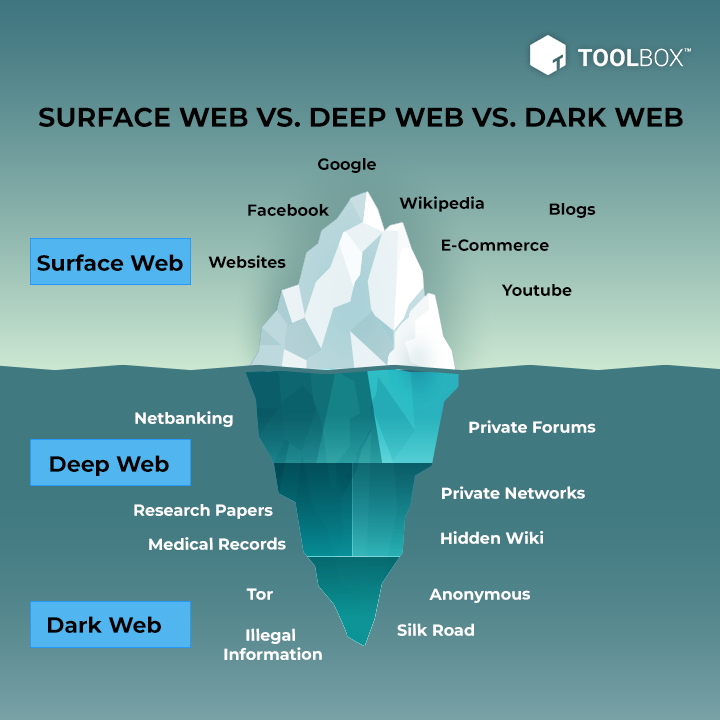
Surface Web: Surface web ဆိုတာကတော့ ကျွန်တောတို့ပုံမှန် search engine တွေကနေ ဝင်ရောက်ရှာဖွေနိုင်သော အပိုင်းများဖြစ်ပါတယ်။ ဉပမာ - Facebook, Google, Bing, Website စသည်တို့ဖြစ်ပါတယ်။ သူ့မှာတော့ ပုံမှန် web browser များမှာအလုပ်လုပ်ပြီး end user တွေရှာဖွေနိုင်အောင် ပြုလုပ်ထားခြင်းဖြစ်ပါတယ်။ ၎င်းတွင် အများသူငှာ ဝဘ်ဆိုက်များ၊ သတင်းဝဘ်ဆိုဒ်များ၊ ဆိုရှယ်မီဒီယာပလပ်ဖောင်းများ၊ အွန်လိုင်းစျေးဝယ်ဆိုဒ်များနှင့် အခြားအများသိကြသည့် ဝဘ်အရင်းအမြစ်များ ပါဝင်သည်။
Deep Web: Invisible web သို့မဟုတ် Hidden Web လို့လဲလူသိများတဲ့ deep web ကိုတော့ တစ်ချို့က ပုံမှန် ရှာလို့ရအောင်လုပ်ထားပေမဲ့ သူ့ရဲ့ ထူးခြားချက်ကတော့ web တိုင်းလိုလိုမှာ index page မရှိတာပါပဲ။ သူ့ကို ဝင်ရောက်ဖို့ဆိုရင် အသုံးပြုသူရဲ့ အထောက်အထားများ (သို့) software တစ်ခုခုလိုအပ်ပါတယ်။ Deep Web include private databases, subscription-based websites, academic research papers, medical records, and other restricted information that is not intended for public consumption.
Dark Web: Dark Web မှာတော့ Deep Web အတွင်းမှာပဲရှိနေပြီး သူ့မှာတော့ Deep Web ထဲမှာပဲ ရည်ရွယ်ချက်ရှိရှိ Hide ထားသော အပိုင်းတစ်ခုဖြစ်ပါတယ်။ Anonymity and Encryption ကို provide လုပ်ပေးသော TOR Browser လိုမျိုး အထူးပြုလုပ်ပေးထားတဲ့ software မျိုးကိုသုံးပြီး Dark Web ကို access လုပ်လို့ရနိုင်ပါတယ်။ Dark web မှာဘာတွေများထူးခြားလဲ သူ့အထဲမှာဘာတွေရှိတာလဲ ဆိုရင်တော့ တရားမဝင်ဈေးကွက်တွေ၊ တရားတဝင် hacker တွေ၊ စာရွက်စာတမ်းအတုတွေ၊ မူးယစ်ဆေးဝါးရောင်းဝယ်ဖောက်ကားမှုများအပြင် တခြားတရားမဝင်တဲ့ အလုပ်မှန်သမျှ dark web မှာအကုန်ရှိပါတယ်။ Dark Web ရဲ့လုပ်ဆောင်ချက်က တရားမဝင်သော်လည်း အမည်ဝှက်နှင့် စည်းကြပ်မှုမရှိသော သဘောတရားများကြောင့် အမည်ဝှက်ပြီး ရာဇဝတ်မှုဖြစ်နိုင်ခြေများကို ကူညီဆောင်ရွက်ပေးခြင်းများကြောင့် နာမည်ကောင်းရရှိထားခြင်းဖြစ်ပါတယ်။
ကျွန်တော်တို့ တော်တော်များများဝင်ရောက်ပြီး Dark Web လို့ပြောနေကြတာက ရောင်းဝယ်ဖောက်ကားမှုနှင့် Leak ဆိုင်ရာတွေကို Deep Web မှာပဲလုပ်ဆောင်ကြပါတယ်။ Dark Web ကိုရောက်တာမျိုးမရှိပါဘူး။ Dark Web လို့လူတိုင်းက ပြောနေကြလို့ ဒီအကြောင်းလေးကိုရေးတင်လိုက်တာဖြစ်ပါတယ်။
From my point of view, I do not believe in dividing the types of Web by how many percent, because no one knows how many real sites are in each type.
2 - TOR Project History
TOR လို့လူသိများတဲ့ The Onion Routing ကတော့ Internet ပေါ်မှာ အမည်ဝှက်ထားဖို့အတွက် Design ထုတ်ထားတဲ့ ထူးခြားလွန်းတဲ့ open-source tool တစ်ခုဖြစ်ပါတယ်။ သူ့ရဲ့အဓိကရည်ရွယ်ချက်ကတော့ Privacy ကိုကာကွယ်ဖို့နဲ့၊ တစ်ဦးချင်းစီရဲ့ data တွေကိုကာကွယ်ဖို့အတွက် onion လမ်းကြောင့်ကိုအသုံးပြုထားပြီး သူ့ကိုအသုံးပြုမယ်ဆိုရင် အထောက်အထားများကို ကာကွယ်နိုင်မယ်ဆိုတာ သေချာစေရန်ဖြစ်ပါတယ်။ Onion ကိုသေချာလေ့လာကြည့်မယ်ဆိုရင်တော့ -
Timeline of the Tor Project:
Mid-1990s: The idea of “onion routing” begins at the U.S. Naval Research Lab (NRL) by David Goldschlag, Mike Reed, and Paul Syverson. The goal is to create internet connections that provide privacy and prevent tracking and surveillance.
Early 2000s: Roger Dingledine, a recent MIT graduate, joins the NRL onion routing project with Paul Syverson. The project is named Tor, which stands for The Onion Routing. Nick Mathewson also joins the project.
October 2002: The Tor network is deployed, with its code released under a free and open software license. It initially has around a dozen volunteer nodes.
2004: The Electronic Frontier Foundation (EFF) starts funding the work on Tor by Roger Dingledine and Nick Mathewson.
2006: The Tor Project, Inc., a nonprofit organization, is founded to maintain Tor’s development. It becomes a 501(c)(3) nonprofit.
2007: Development of bridges to the Tor network begins to address censorship and help users bypass government firewalls.
2008: Development of Tor Browser begins, making Tor more accessible to everyday internet users.
Late 2010: Tor gains prominence during the Arab Spring, providing privacy and access to blocked resources for activists.
2013: The Snowden revelations increase awareness of surveillance and the importance of privacy tools. Tor is crucial to Snowden’s whistleblowing efforts and is proven to be secure from cracking at that time.
Present: The Tor network has thousands of relays operated by volunteers and millions of users worldwide. It remains a vital tool for privacy and freedom online.
The Tor Project continues to fight for private access to an uncensored internet and is committed to transparency and user safety. It is supported by a global community dedicated to human rights.
— TOR as it is available for various operating systems, including Windows, macOS, Linux, Android, and iOS.
3 - How TOR is Actually Work?
The Onion routing is a proxy used to anonymize your communication on the internet used with TOR browser bundle, Routing the internet traffic through a series of encrypted connection called tor node and all Path called tor circuit.
TOR Node: is an volunteer operated server that helps to facilitate anonymous and private internet communication by relaying encrypted data packets between users, thereby obscuring the origin and destination of the traffic.
Entry Node: The first node in the circuit also known as (Guard node) that receives the user’s encrypted data packets and strips off one layer of encryption to reveal the address of the middle node, It not secure cause ISP (Internet Service Provider) knowing that you are trying to connect to the TOR network .
Middle Node: The second node in the circuit that receives the data packets from the entry node, decrypts another layer of encryption, and forwards the packets to the exit node, It secure and not monitor
Exit Node: The final node in the circuit that receives the data packets from the middle node, decrypts the last layer of encryption, and sends the packets to their intended destination on the internet, And send the response recevied back
WORKFLOW…
It called onion routing cause the process look like an onion layers.
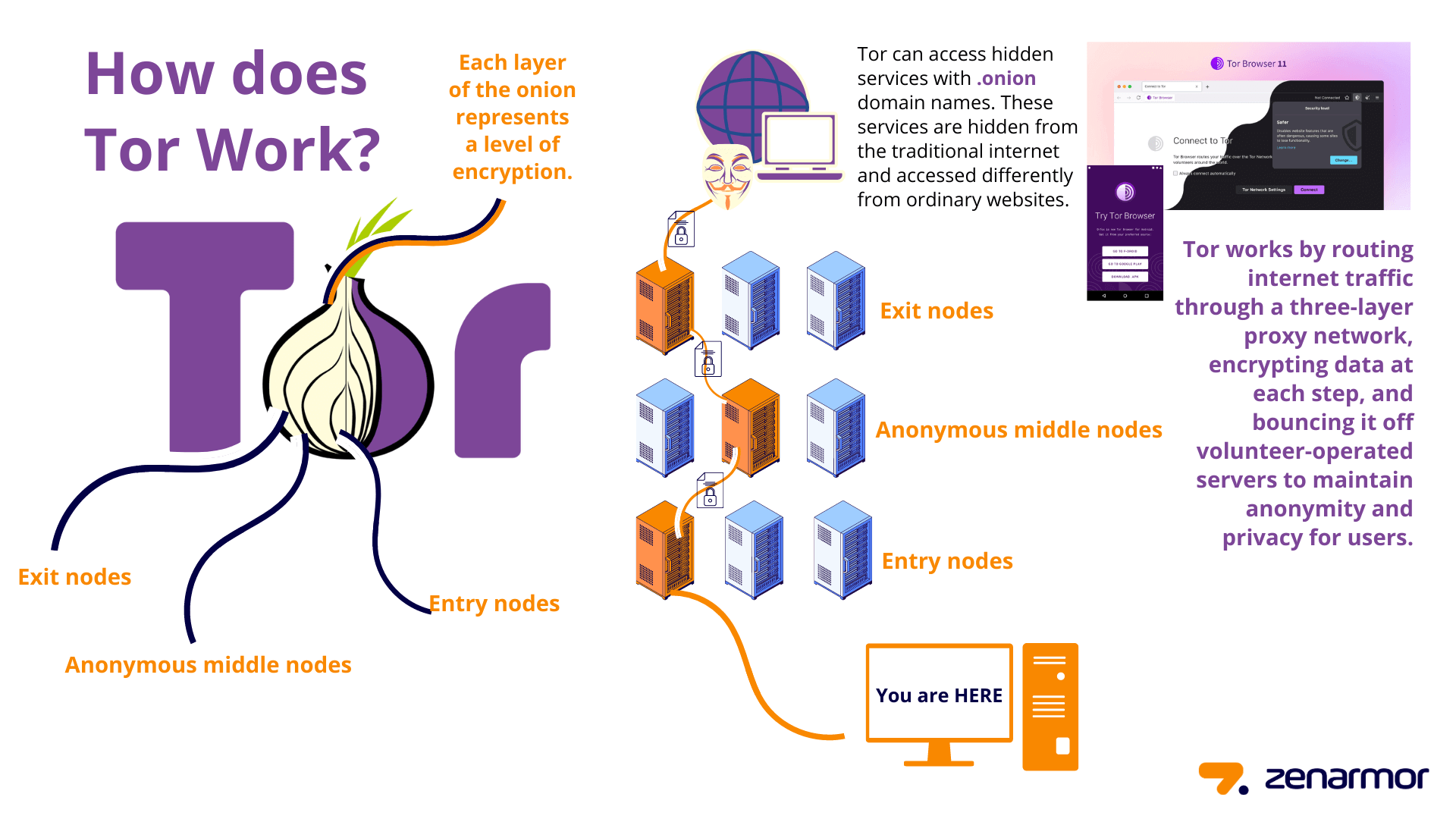
First: Your PC connects to the initial node in the Tor circuit. The initial node decrypts the message, revealing the IP address of the next node, and forwards the message to the middle node.
Second: The middle node decrypts the message to uncover the IP address of the exit node, and then forwards the message to the exit node.
Third: The exit node decrypts the message, revealing the destination IP address, and forwards it to the intended site, here is the last step in layers decapsulation
Finally: The response is sent back using an encapsulation process.
The encryption used is normally AES with the key being shared via Diffie-Hellman key exchange
4-KEY POINT OF TOR
There is always a minimum of 3 connections nodes in TOR circut
Each Tor node in the circuit only knows the IP address of the node before it and the node after it. This design is intentional to enhance user privacy and anonymity. It ensures that no single node along the route has complete knowledge of both the source and the destination of the data being transmitted. By limiting the information each node possesses to just the adjacent nodes, Tor helps to obscure the full path and protect the identities of the users.
The first connection know your real IP address
The last connection know what in side the message and destination site
Increasing the length of the Circuit does not create more security & anonymity
TOR Browser has worth security features that improve the browsing security
TOR called onion routing to because it add layer of encryption at each stage or node
Nodes in the Tor network are indeed chosen in a random manner to enhance security and prevent correlation attacks to increase the difficulty of tracking and identifying users. Randomization adds an extra layer of protection by diversifying the paths and nodes used for relaying traffic
Exit Node Restricted to serve as the final node in the circuit, unable to function as an entry or middle node.
Onion URLs are generated randomly and are required to end with the “.onion” extension. There are two versions of Onion URLs:
v2: These URLs consist of 16 characters and are based on an 80-bit hash algorithm.
v3: These URLs consist of 56 characters and are based on a stronger 256-bit hash algorithm.Onion sites in the Tor network typically use HTTP instead of HTTPS. This is because the Tor network itself provides encryption and anonymity for the data transmitted between the user and the onion site.
5-TOR BRIDGE
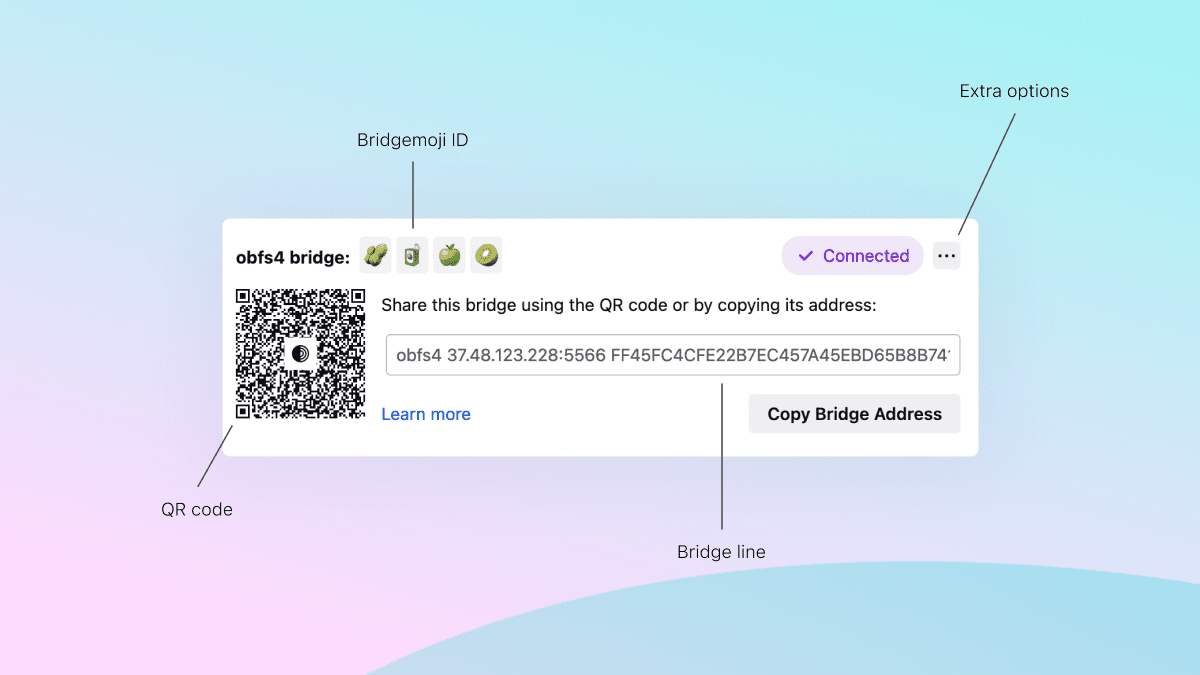
A Tor bridge Is a feature in TOR browser, also known as an “obfuscated bridge,” is a special type of Tor relay that helps users bypass internet censorship and access the Tor network in restrictive environments. It serves as an entry point to the Tor network, similar to a regular Tor relay or entry node, but it employs additional obfuscation techniques to make its traffic less recognizable as Tor traffic.
The primary purpose of a Tor bridge is to assist users who are facing network restrictions or censorship that may block or detect regular Tor connections. By using a bridge, users can circumvent these restrictions and access the Tor network, thereby preserving their privacy, anonymity, and ability to access censored information.
Tor bridges achieve obfuscation by altering the network traffic patterns associated with Tor, making it harder for censors to identify and block Tor connections. They may use various methods, such as transforming Tor traffic to resemble other types of encrypted traffic or disguising it within protocols that are typically allowed in the restricted environment.
1-Tor User -> Guard Relay -> Middle Relay -> Exit Relay -> Destination
When using a bridge:-
2-Tor User -> Bridge Relay -> Middle Relay -> Exit Relay -> Destination
obfs4: obfs4 disguises Tor traffic to appear random, making it difficult for censors to detect bridges through Internet scanning. Compared to its predecessor, obfs3, obfs4 bridges are less prone to being blocked.
meek: meek transports camouflage Tor usage by mimicking typical browsing behavior on well-known websites. Specifically, meek-azure imitates Microsoft websites to further blend in.
Snowflake: Snowflake reroutes connections through volunteer-operated proxies, simulating a video call rather than Tor usage.
WebTunnel: WebTunnel obscures Tor connections by presenting them as regular HTTPS website accesses.
6-PGP
PGP (Pretty Good Privacy) is not directly used within the Tor network itself, but it can be used in conjunction with Tor for secure communication and encryption of messages.
PGP is a widely-used encryption software that provides cryptographic privacy and authentication. It uses a combination of symmetric and asymmetric encryption algorithms to secure the confidentiality and integrity of data.
While Tor focuses on routing and anonymizing network traffic, PGP can be employed to encrypt and decrypt messages, files, or emails exchanged between users within the Tor network or any other communication channel.
When using PGP in conjunction with Tor, users can encrypt their messages or files before sending them through the Tor network. This adds an extra layer of security, ensuring that even if the Tor network were compromised, the content of the communication remains encrypted and unreadable to anyone without the decryption key.
To use PGP in Tor, users typically generate a key pair — a public key and a private key. The public key is shared with others, allowing them to encrypt messages intended for the user. The private key is kept securely by the user and is used to decrypt messages encrypted with the corresponding public key.

6.1
7-TAILS OS

7.1
Tails OS (The Amnesic Incognito Live System) is a privacy-focused operating system designed to provide anonymity and security while using the internet. It is specifically crafted for use with Tor and is highly regarded in the privacy and security community.
Here are some key points to explain the importance of Tails OS within the context of Tor for your book:
1-Anonymity: Tails OS is designed to preserve user anonymity by routing all internet traffic through the Tor network. This ensures that a user’s online activities are obfuscated, making it difficult to track or identify them.
2-Live System: Tails OS is a “live” operating system, meaning it can be booted directly from a USB drive or DVD without leaving any traces on the host computer. This feature helps to maintain privacy by not storing any data or information on the local machine.
3-Security and Privacy Tools: Tails OS comes bundled with a range of security and privacy tools, including built-in encryption tools, secure deletion utilities, and password managers. These tools enable users to protect their data, communications, and online activities while using Tor.
4-Amnesic Nature: Tails OS is designed to be amnesic, meaning it forgets everything after each session. This ensures that no traces of activity, such as browsing history, cookies, or cached files, are left behind.
5-Preconfigured Tor Integration: Tails OS has Tor integration built-in, simplifying the process of securely connecting to the Tor network. It ensures that all internet traffic is automatically routed through Tor, providing a seamless and secure browsing experience.
6-Wide Applicability: Tails OS can be used on various devices, including laptops and desktop computers, making it accessible to a wide range of users who prioritize privacy and security.
- Using a dedicated operating system like Tails is really important if you want to boost your privacy and stay anonymous while using Tor. It’s all about making sure your online activities are secure and your identity is protected. Tails is specifically designed for that. It’s an operating system that works hand in hand with Tor to give you that extra layer of protection. By using Tails, you’re showing that you take privacy seriously. It’s like a commitment to keeping your information safe. And the cool thing is, Tails routes all your internet traffic through Tor automatically, making it harder for anyone to track you. Plus, Tails is amnesic, meaning it forgets everything after you’re done using it. No traces left behind. So when you combine Tails OS with Tor, you’re really leveling up your privacy game. It’s a powerful combination that gives you the peace of mind you’re looking for.
8-PROXYCHAINS
ProxyChains is a versatile tool used for routing network connections through proxy servers. It allows you to improve your privacy and bypass network restrictions by redirecting your network traffic through a series of proxy servers. The configuration file for ProxyChains is typically located at /etc/proxychains.conf.
The /etc/proxychains.conf file is where you can define the settings for ProxyChains. Here are some key aspects of the configuration file:
General Information:
# proxychains.conf VER 3.1indicates the configuration file format and version.# # HTTP, SOCKS4, SOCKS5 tunneling proxifier with DNS. #provides a descriptive overview of ProxyChains' functionality.
Proxy Chain Selection:
dynamic_chain: This option dynamically chooses a proxy from theProxyListfor each connection. If a proxy is unavailable, it's skipped, and the application receives an EINTR (interrupted system call) error. This offers flexibility but may not guarantee consistent routing.strict_chain: All proxies in theProxyListmust be online for a connection to succeed. If any are unavailable, an EINTR error occurs. This enforces strict chain usage but can be inflexible.random_chain: A random proxy (or chain ifchain_lenis set) is chosen for each connection. This provides anonymity but may sacrifice performance and reliability.
Other Settings:
quiet_mode: Disables output from the library, making operations silent.proxy_dns: Routes DNS requests through the proxies as well, enhancing privacy but potentially impacting some applications.tcp_read_time_outandtcp_connect_time_out: Specify timeouts for TCP connections in milliseconds, controlling how long ProxyChains waits before considering a connection failed.[ProxyList]section defines the list of proxies ProxyChains can use. Format:type host port [user pass]. Validtypes arehttp,socks4, andsocks5. Authentication details (user pass) are optional.
Default Proxy:
socks4 127.0.0.1 9050: This line configures ProxyChains to use a local SOCKS4 proxy on port 9050 (typically Tor) by default. If you don't have Tor running, this proxy won't be available.
9-BITCOAIN
Bitcoin:- is a cryptocurrency that operates on a blockchain algorithm, making it the most widely used digital currency in the dark web due to its ability to provide privacy and anonymity while ensuring that transactions remain detached from personal identities. It is a decentralized cryptocurrency, meaning that it operates without government or corporate control and is governed by its user base. This decentralized nature ensures that no single entity can manipulate or manage the entire network, enhancing its security and resilience.
Bitcoin’s history dates back to its creation in 2009 by an individual or group known as Satoshi Nakamoto. It was the pioneering cryptocurrency, laying the foundation for the development of other digital currencies. Bitcoin operates through a distributed network of computers, called nodes, which maintain a copy of the blockchain — a public ledger that records all Bitcoin transactions in a chronological and immutable manner.
The functioning of Bitcoin relies on a consensus mechanism known as Proof of Work (PoW), which involves miners competing to solve complex mathematical puzzles. Mining is the process by which new transactions are validated, and new blocks are added to the blockchain. Miners use specialized hardware and computational power to perform these calculations, and the first miner to solve the puzzle and validate the block is rewarded with newly minted Bitcoins.
To initiate a Bitcoin transaction, users create a digital signature using their private key, providing proof of ownership and authorizing the transfer of funds. The transaction details are broadcasted to the network, where miners verify its validity. Once confirmed, the transaction is included in a block, and the block is added to the blockchain, ensuring the integrity and security of the network.
Bitcoin’s decentralized and transparent nature has expanded its adoption beyond the dark web, attracting individuals, businesses, and even institutional investors. It offers a transformative financial system characterized by decentralization, transparency, and the potential for a secure and borderless medium of exchange.
While Bitcoin’s association with the dark web highlights its privacy features, it is important to recognize that it is also used for legal and legitimate purposes globally. However, it is essential to navigate the legal and regulatory landscape surrounding cryptocurrency transactions and adopt robust security practices to mitigate risks associated with the use of Bitcoin and other cryptocurrencies.
10-THE END
Disclaimer:
The information presented in article is for educational purposes only. It is not intended to promote or facilitate any illegal or unethical activities. Tor is a powerful tool that can be used for both good and bad purposes. It is crucial to understand the legal and ethical implications of using Tor before engaging with it.
Specifically:
Do not use Tor to access illegal content or engage in illegal activities. This includes accessing copyrighted material without permission, hacking into systems, or participating in cybercrime.
Do not use Tor to violate the terms of service of any website or service. This could result in your account being banned or legal consequences.
Be aware that using Tor may raise suspicion from authorities. If you are concerned about privacy, consider using additional security measures beyond Tor.
Remember that Tor is not foolproof. While it offers anonymity, its effectiveness can be limited by various factors.


